What's inside
Every tool a project needs — now with AI built in. Tasks, scheduling, chat, invoicing, and more — connected from day one. No integrations to wire up. No five subscriptions.
Included on every plan
Describe your project in plain language. BluePrint generates the full plan — phases, tasks, dependencies, team assignments, risk items, and a project charter. Then it stays available inside your project to manage changes with full scheduling intelligence.
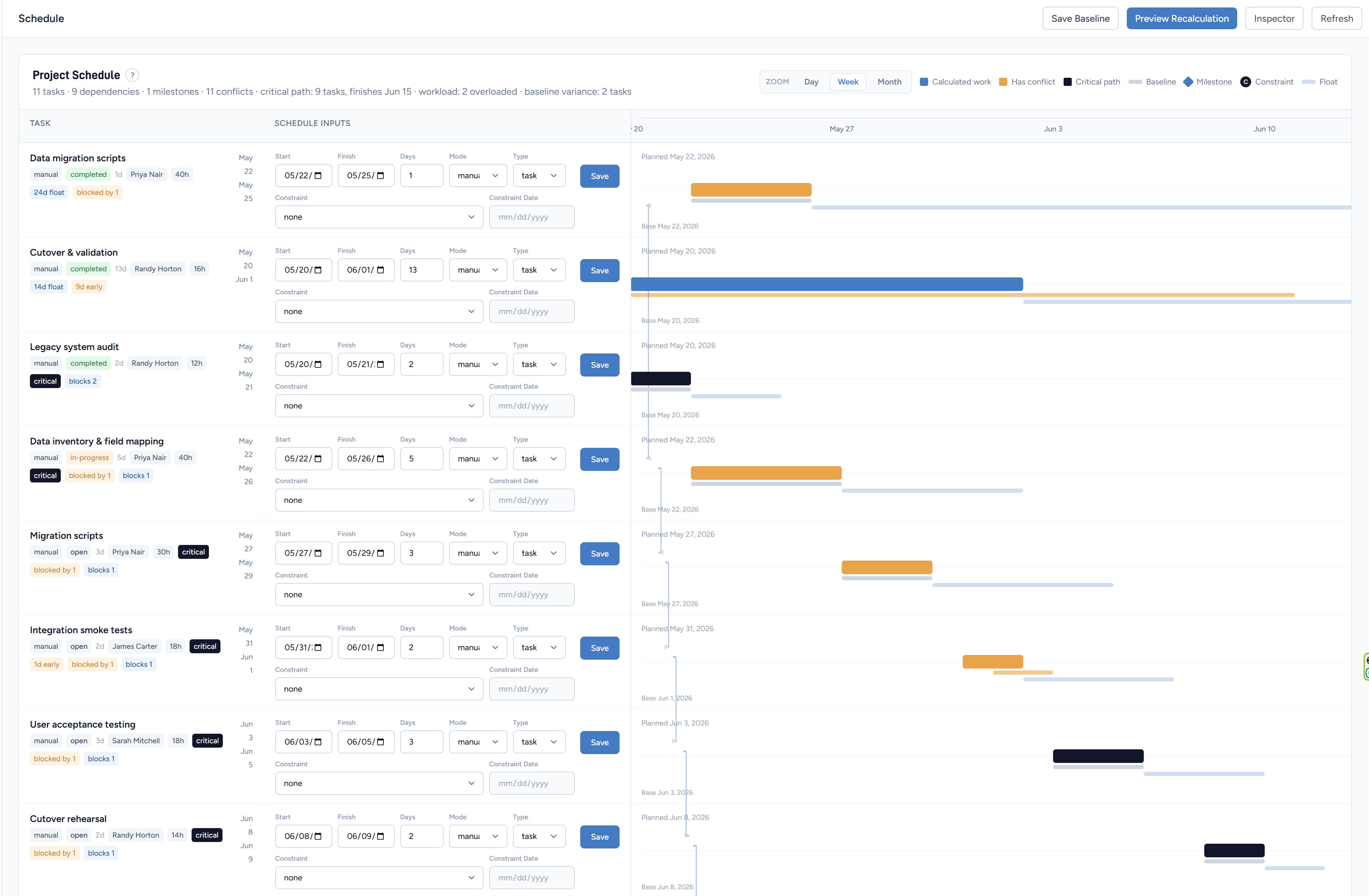
Explore BluePrint AIDependencies, constraints, critical path, workload pressure, baseline drift, and what-if previews work together so the project schedule reflects the actual work.
Explore the Scheduling EngineCreate tasks with titles, descriptions, priorities, due dates, and assignees. Attach tasks to projects and track status through a configurable workflow — from backlog to done.
Real-time chat rooms built into every project. Create named rooms for different topics — every conversation stays in context, exactly where the work lives.
Long-form communication with threaded replies. Project announcements, decision logs, and status updates that need context — without cluttering chat.
Two separate modules: Files for attachments and binaries, Documents for formal deliverables. Upload, download, and organize everything tied to the project.
Separate issue and defect trackers for granular quality management. Assign severity, link to tasks, track resolution, and ship with confidence.
A built-in project wiki. Document decisions, runbooks, onboarding guides, and processes — right where the work lives. No more lost Google Docs.
Create milestones, sprints, meetings, and deadlines on a shared project calendar. Everyone on the team sees what's coming — no more missed dates.
Formal change request workflow to manage scope changes, track impact assessments, and keep a clear audit trail of what was agreed and when.
Track prospects and deals alongside active projects. Move opportunities through pipeline stages, link them to clients, and convert wins directly into new projects — no CRM switching required.
BluePrint — AI Project Setup
BluePrint is ProjectSpace's built-in AI project setup assistant. Tell it what you're building — in plain language — and it generates the full project plan: phases, tasks, dependencies, team assignments, risk items, and a project charter. It saves a schedule baseline so you can track drift from day one.
BluePrint
Website RedesignGot it — Client Deliverable, fixed-fee. Building your project plan now.
Project Scheduling Engine
ProjectSpace includes a modern project scheduling engine for teams that need more than a timeline. Dependencies, constraints, critical path, workload pressure, baseline drift, and what-if previews work together so project managers can understand delivery impact before changing the plan.
Pro & Business
Time tracking, invoicing, and expense management — no spreadsheets, no third-party tools.
Stop guessing where your team's time goes. Log hours directly against projects and tasks, see real burn rates, and arm yourself with real data when clients ask why something took so long.
Time entries — Website Redesign
Homepage layout
Jane D. · May 2
3.5 hrs
BillableClient review call
Ryan H. · May 2
1.0 hr
BillableInternal planning
Jane D. · May 1
2.0 hrs
Non-billableTotal billable
4.5 hrs
Generate professional invoices from your tracked time and expenses without touching a spreadsheet. Everything lives inside the project, so billing is always in sync with the work.
Invoice #INV-0012
DraftWebsite Redesign — May 2026
| Design work (Jane D.) | 3.5 hrs × $95 | $332.50 |
| Client review (Ryan H.) | 1.0 hr × $95 | $95.00 |
Track every project expense — software, contractors, travel, materials — and add them to invoices for client reimbursement. Snap a picture of the receipt and it stays with the expense. No more lost receipts or surprise write-offs.
Expenses — Q3 Infrastructure
AWS hosting — May
Software · May 1
$248.00
BillableFigma subscription
Software · May 1
$45.00
InternalTotal billable
$248.00
Get started today
Start free. No credit card, no expiry on the free plan.